
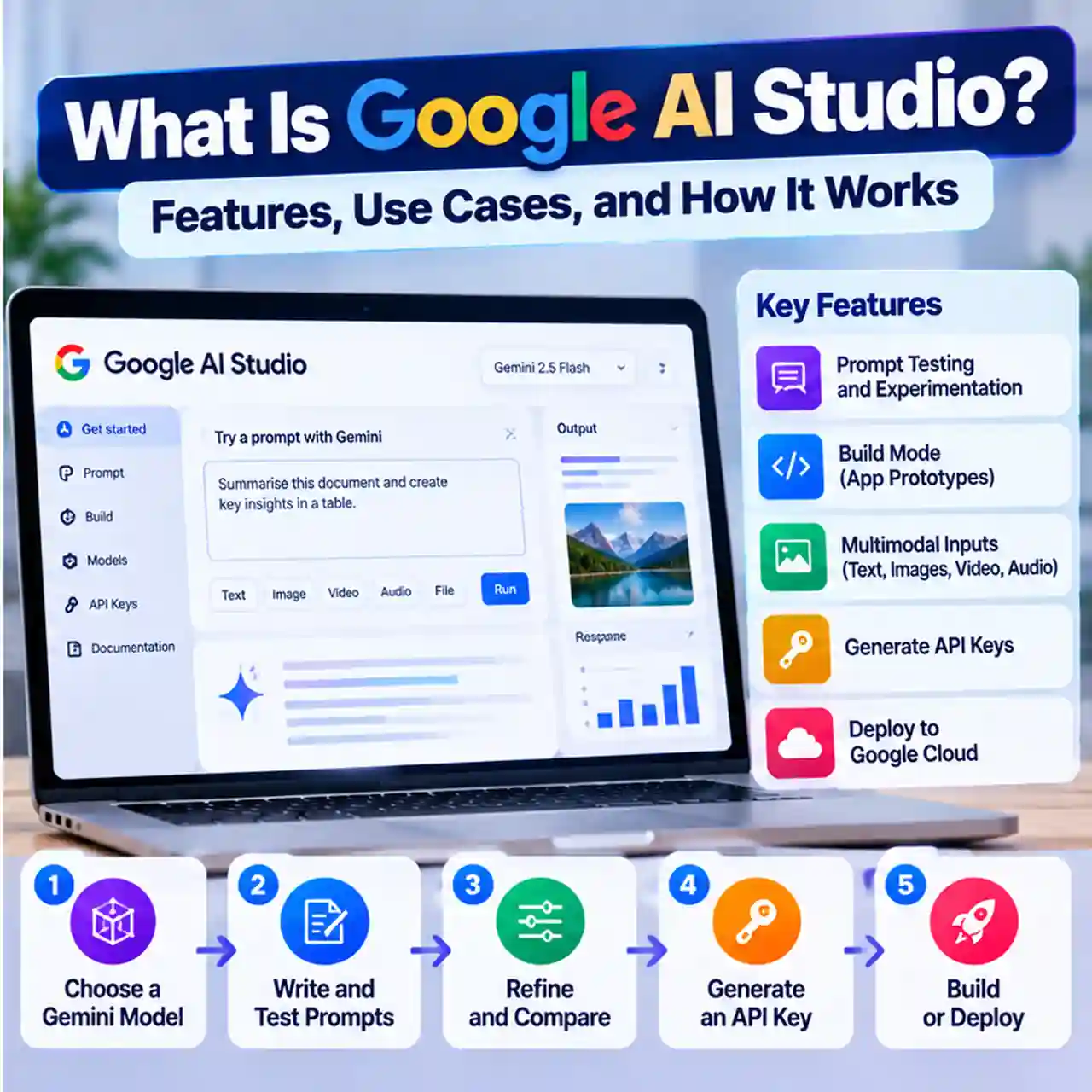
What Is Google AI Studio?
Google AI Studio is a web-based platform for experimenting with Gemini, Google's family of multimodal generative AI models. It is the primary environment for developers, product teams, and technical researchers who want to test Gemini's capabilities, refine prompts before production, generate API keys, and build functional prototypes.
It is worth clarifying where Google AI Studio sits among Google's AI products. The Gemini app is a consumer assistant for everyday tasks. Google AI Studio is the development and experimentation workspace. The Gemini API is what developers integrate into their own applications. You typically use Google AI Studio to design and test what you will later deploy through the API.
Quick answer: Google AI Studio is Google's development environment for Gemini. It lets you test prompts, work with multimodal inputs, generate API keys, and build Gemini-powered application prototypes — all in a browser, without writing code to start.
How Google AI Studio Works
The platform follows a straightforward workflow from initial experimentation to production-ready integration:
Step 1: Choose a Gemini Model
Google AI Studio provides access to multiple Gemini models, each suited to different priorities. Gemini 2.5 Flash handles fast, broad-purpose tasks across text, images, video, and audio. Gemini 2.5 Flash-Lite is optimised for cost efficiency on high-volume workloads. More recent Gemini models support advanced coding and reasoning tasks. Your choice depends on whether speed, cost, or reasoning depth matters most for your use case.
Step 2: Write and Test Prompts
Enter instructions in the prompt interface and supply any additional inputs — images, documents, audio clips, or video — depending on which model you are using. The platform returns the model's response immediately, allowing you to evaluate quality before building anything around it.
Step 3: Refine and Compare
Prompt testing is one of Google AI Studio's most valuable features. You can modify instructions, compare how different models respond to the same prompt, and iterate until you have a reliable, high-quality output pattern. Testing here prevents costly debugging later when your prompt is already embedded in a production application.
Step 4: Generate an API Key
When you are satisfied with your prompt and model choice, Google AI Studio lets you generate a Gemini API key directly from the interface. This key is what connects your application to Gemini through the official SDK or REST API. Python and JavaScript SDKs are both supported.
Step 5: Build or Deploy
You can move from testing to implementation through two routes: write your own application using the generated API key, or use Build mode to generate a working prototype from a natural language description.
Key Features
Prompt Testing and Experimentation
The prompt testing environment is where most users spend the majority of their time in Google AI Studio. The difference between a vague prompt and a well-engineered one is substantial. Consider the contrast between asking a model to "summarise this report" versus asking it to "summarise this report for a project manager, identify the three biggest risks and any missed deadlines, and return the answer as a table." The second version produces far more consistent, actionable output — and Google AI Studio is the environment in which you establish that consistency before deployment.
Build Mode
Build mode converts natural language application descriptions into working prototypes. Describe what you want to build — for example, an application that takes a product image as input and generates social media captions for different audiences — and Gemini generates a functional starting point. Prototypes can be exported to GitHub or deployed directly to Google Cloud Run.
Build mode is useful for early prototyping and stakeholder demonstrations. Complex production applications still require development expertise for security, data handling, error management, and integration work.
Multimodal Inputs
Depending on the model selected, Google AI Studio supports text, images, audio files, video, and uploaded documents as inputs. This makes it possible to build applications that go well beyond chatbot interactions — image analysis tools, document processing pipelines, audio transcription workflows, and video understanding features can all be prototyped within the same environment.
API Key Management
API keys generated in Google AI Studio should be treated as sensitive credentials. They must not be exposed in client-side code or committed to public repositories. Build mode addresses this by configuring keys as server-side secrets automatically. For manually built applications, the standard practice is to store keys in environment variables and access them server-side only.
Google AI Studio vs Gemini App
FeatureGoogle AI StudioGemini AppPrimary purposeExperimenting, building, and prototypingEveryday assistance and task completionPrompt testingYes — side-by-side comparison supportedLimitedAPI key generationYesNoApp prototypingYes (Build mode)Not primary purposeMultimodal inputsYes — text, image, audio, video, documentsYesBest forDevelopers, product teams, experimentersGeneral usersWho Should Use Google AI Studio?
Developers
Developers use Google AI Studio to design, test, and refine prompts before integrating them into applications through the Gemini API. The prompt testing environment significantly reduces the number of iterations required once code is involved, saving considerable development time.
Product Managers and Founders
Product teams use Build mode to generate early prototypes that can be demonstrated to stakeholders or used to validate a product concept before committing engineering resources. A working demo produced in Build mode communicates far more clearly than a specification document.
Data Scientists and Researchers
Researchers exploring Gemini's capabilities across different domains — document understanding, image analysis, structured output generation — can use Google AI Studio as an interactive laboratory without building tooling infrastructure first.
Content and Marketing Teams
Teams that need to process content at scale — summarising documents, extracting structured data from unstructured text, generating copy variations — can prototype these workflows in Google AI Studio before handing them to engineering for production implementation.
Beginners Learning AI Development
Google AI Studio is accessible without prior AI experience. Learners can observe how different prompt formulations affect model output, experiment with multimodal inputs, and understand the basic mechanics of the Gemini API before writing any code. It is a practical, low-friction starting point for AI literacy.
Is Google AI Studio Free?
Accessing Google AI Studio itself is free in supported regions. Certain Gemini models offer a free tier through the Gemini API with usage limits — Gemini 2.5 Flash has available free-tier access, for example. Higher usage volumes, access to more capable models, or production-level rate limits
Get a free marketing audit
See exactly where your SEO, ads and website are leaving money on the table.